Amazon Fire Kids Tablet vs iPad for a 4-Year-Old: The Honest, Unfiltered Review from a Tech-Obsessed Mama

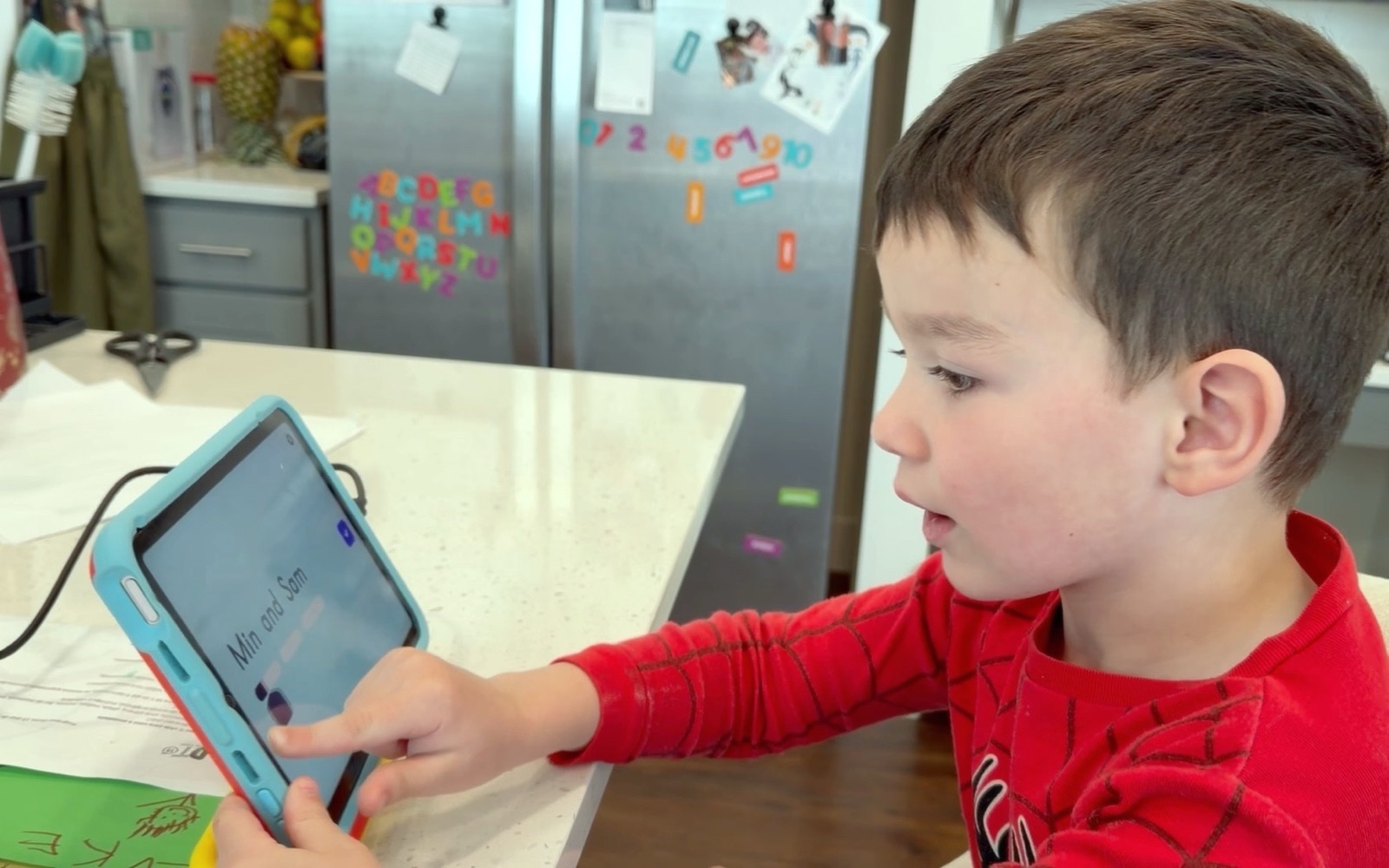
We use an iPad, and I have never owned a Fire — so this is my honest experience with one and careful research on the other. Short version: the Fire wins on price and on not caring if it gets destroyed; the iPad wins on speed, app quality, and lasting into elementary school. Which is right depends entirely on your budget and how hard your kid is on things.
On this page
Okay so… picture this. It’s 6:00 AM on a crisp, chilly Colorado morning. Hubs is packing up the back of the truck with gear, Luke is decked out in his full camo sweater because he insists on looking exactly like his dad, and I am clutching my massive iced coffee like my life depends on it. My 4-year-old little dude is sitting on the tailgate in full camo, super pumped for a day on the river. But we all know that the two-hour drive up into the mountains requires one very specific survival tool in the backseat: a tablet.
Listen, friend, if you are currently staring at your screen wondering whether you should go with an Amazon Fire Kids tablet or splurge on an Apple iPad for your wild 4-year-old, I have been directly in your shoes. I am a tech-obsessed mama—seriously, if there is a tech tool, a clever setup, or a crazy case that makes parenting easier, I have put it in my cart. But when it comes to spending hard-earned money on tech for a kid who routinely tries to climb boulders while carrying his snacks, you need real, unfiltered facts.
Before we dive into the total showdown, quick heads up: this post contains a few affiliate links, which means I might earn a tiny commission if you buy through them at zero extra cost to you (and it keeps my iced coffee stash fully funded!).
Now grab your drink, get comfortable on the couch, and let’s break down the Amazon Fire Kids vs iPad debate once and for all.
Straight with you before we start: we have an iPad, and we have never owned a Fire Kids tablet. So everything I say about the iPad is from living with it; everything I say about the Fire is from research, spec sheets, and a lot of reading what other parents of 4-year-olds actually report. I would rather tell you that than pretend I stress-tested both. Where I am guessing, I say so.
Why are we even comparing a budget tablet to an expensive iPad?
I know what you might be thinking: Annie, isn’t comparing a Fire tablet to an iPad like comparing a cozy family camper to a luxury sports car? Well, yes and no! When you have a high-energy 4-year-old who is a kindergartner with big opinions, huge energy, and hands that are constantly sticky from juice boxes or sushi (yes, my 4-year-old is obsessed with salmon rolls, don’t ask), the math changes.
You aren’t just buying a screen. You are buying sanity during long mountain road trips, quiet during restaurant dinners, and actual educational tools that help them learn their letters and numbers. But you are ALSO balancing the very real risk that your little dude might accidentally drop the thing onto asphalt, spill water all over it, or sit on it during a camping trip.
So we have to look at durability, usability, content quality, and parental sanity. Let’s look at how both options handle the chaos of real life.
What makes the Amazon Fire HD Kids Edition great for a wild 4-year-old? (The Pros)
Let’s start with the tablet that almost every mom gets recommended first: the Amazon Fire HD Kids Edition. We used this bad boy for a long time with Luke, and there are some huge reasons why it’s a staple in so many households.
1. The Two-Year Worry-Free Guarantee is pure magic
I am putting this first because, holy hell, Amazon absolutely nailed this policy. If your 4-year-old drops it on a rock while you’re out hiking, steps on it in the tent, or chucks it across the living room during a epic meltdown, Amazon replaces it. No questions asked. For a mom of a sweet, stubborn, crazy-high-energy boy, that peace of mind is unmatched.
2. The built-in foam case is a literal brick wall
The bumper case that comes wrapped around the Fire Kids tablet is thick, squishy, and downright indestructible. Luke has dropped his on dirt trails, wooden decks, and concrete garage floors. The tablet inside remained completely untouched. You don’t have to buy a separate case; it’s ready for battle right out of the box.
3. You cannot beat the price point
You can frequently grab the Amazon Fire Kids 8 or 10 heavily discounted (especially around holidays or Prime day). If it gets lost at a campsite or completely submerged in a river (knock on wood), your heart won’t stop the way it would if an iPad went down.
4. Built-in, aggressive parental controls
The Amazon Kids+ dashboard gives you insane control over what your kid can do. You can set strict educational goals—like requiring 30 minutes of reading apps before any videos unlock—and lock down screen time down to the exact minute.
Where does the Amazon Fire Kids tablet fall down? (The Cons)
The complaints are remarkably consistent once you read enough reviews from parents of 4-and-up kids — and they are all the same complaint, which is why I take them seriously.
1. The interface is unbelievably laggy and slow
This is the complaint that comes up over and over: swiping between screens stutters, and apps take a beat too long to open. That delay is nothing to an adult and everything to a 4-year-old — the pattern parents describe is the kid tapping the icon four times because nothing happened, and the tablet locking up under all four taps. Knowing Luke, that is exactly what would happen here.
2. The home screen is total chaotic clutter
The main screen on Amazon Kids+ is an endless wall of thumbnails, and everything on it looks like something waiting to be downloaded. The reports I trust all say the same thing: the kid taps whatever looks shiny, storage fills with cartoons and knockoff games, and clearing it out becomes a recurring chore for the parent.
3. The Amazon Appstore is super limited
You don’t get the full Google Play Store or Apple App Store. That means missing out on top-tier educational games, smooth native apps, and better-designed user experiences. Many apps on the Amazon store feel like ad-riddled, low-budget imitations.
Is an iPad actually worth the big bucks for a 4-year-old little dude? (The Pros)
We went with an older base-model iPad in a very thick protective case, and have used it out with Luke. Here is why the iPad instantly stole our hearts.
1. Buttery-smooth, instant performance
The difference in speed is night and day. Apps open instantly. Touch responsiveness is flawless. For a 4-year-old who is practicing fine motor skills and navigating educational games, this lack of lag keeps their frustration levels at zero.
2. The app ecosystem is unmatched
The quality of apps available on iOS is lightyears ahead. Apps like Khan Academy Kids, PBS Kids, Pok Pok, and Endless Alphabet run like a dream. As a pre-K kid, Luke actually gets genuine learning value out of his screen time now—he practices tracing letters, building puzzles, and listening to audiobooks without annoying pop-ups or clunky interfaces.
3. Long-term investment that grows with them
An iPad isn’t something your child will outgrow in a year. The base-model iPad will easily last 4 to 5 years with proper care. It can handle homework apps, drawing tools, and family video calls with grandparents seamlessly as he gets older.
4. Effortless integration if you are an Apple house
Since Hubs and I both use iPhones, setting up an iPad, managing Screen Time remotely from my phone, AirDropping offline movies for trips, and sharing photo albums is completely seamless.
What sucks about giving an iPad to a 4-year-old? (The Cons)
Now, let’s keep it real—giving a $300-$400 piece of glass to a child who still occasionally forgets not to wipe his hands on his shirt isn’t all sunshine and rainbows.
1. The price will make your heart skip a beat
It is expensive. Period. Even a base-model iPad or a refurbished version costs significantly more than a Fire tablet. Adding AppleCare+ is practically non-negotiable for mama-peace-of-mind.
2. You MUST buy serious heavy-duty protection
You cannot hand a bare iPad to a 4-year-old. You need to immediately add a heavy-duty foam or rubber case with a built-in screen protector. If you don’t, that screen is toast the first time it hits the kitchen tile.
3. The iPad takes more setting up than a Fire does
This is a real difference, but I do not want to oversell it. A Fire Kids arrives with the child profile basically done for you. With an iPad you do it yourself: Screen Time, turning off in-app purchases, restricting Safari, and arranging the home screen so he is not staring at my banking app.
Here is the honest version: it is more steps, and none of the steps are hard. Apple walks you through it, it is genuinely step by step, and you do it once. Sit down with your coffee and it is done. Worth knowing before you buy — not a reason to decide against it.
How do you actually decide? (My Step-by-Step Mama Framework)
If you’re sitting there asking, “Annie, which one should I buy today?” here is my simple decision framework based on your exact situation:
-
Buy the Amazon Fire Kids Tablet if:
- Your budget is strictly under $100–$120.
- Your 4-year-old is extremely rough on toys and prone to throwing things when mad.
- You primarily need a device for long car rides, airplane travel, or outdoor camping trips where damage/loss risk is high.
- You want out-of-the-box restrictions without tweaking settings for an hour.
-
Buy the iPad if:
- You want high-quality educational apps that run without lag.
- You already live in the Apple ecosystem (iPhone, Mac, iPad).
- You are willing to put a heavy-duty case on it and want a device that lasts for several years.
- You want a clean, organized home screen without endless suggested bloatware downloads.
In our house it is the iPad, and I want to be straight with you about why: we already had one. That is not a noble reason, it is just the truth. It has held up, Luke uses Khan Academy Kids on it constantly, and it has never once frozen on him — but I did not arrive there after testing both. But listen—there is ZERO shame in going the Fire tablet route if that fits your family’s budget and vibe right now!
What accessories do you 100% need to survive tablet time with a 4-year-old?
I cannot leave you hanging without my absolute must-have accessories for whichever screen you choose:
- Heavy-Duty Foam Handle Case: If you get an iPad, buy one of those thick EVA-foam cases with the convertible handle/stand. It makes it easy for little hands to carry and absorbs major drops.
- Volume-Limiting Bluetooth Headphones: Absolutely essential for backseat sanity during road trips. Look for headphones hard-capped at 85dB to protect your 4-year-old’s hearing.
- Screen Protector (Tempered Glass): Put this on immediately before your child even breathes on the device. Clean glass = happy mama.
- Car Headrest Mount: Perfect for long drives through the mountains when you just need your little dude to sit back and relax.
Affiliate link — if you sign up or buy through it, My Mama Mode may earn a small commission at no extra cost to you. As an Amazon Associate, My Mama Mode earns from qualifying purchases. My Mama Mode also participates in other retailer affiliate programs. Learn more.
Frequently asked
If you want zero lag and high-quality educational apps like Khan Academy Kids or Endless Alphabet, it absolutely is! The buttery-smooth performance means far fewer road trip meltdowns over frozen screens, and a base-model iPad will easily last 4 to 5 years with proper care. You just have to be ready to spend extra cash upfront for the device and a heavy-duty case.
It is pure magic for mamas because Amazon offers a 2-year worry-free guarantee with no questions asked. If your 4-year-old drops the tablet on a rock while hiking, steps on it in a tent, or chucks it across the room during a meltdown, Amazon replaces it. That peace of mind is unmatched if you have a wild little dude who is rough on his toys.
You cannot hand a bare piece of glass to a 4-year-old, so plan to budget for a thick EVA-foam case right away with a handle. You will also want to put a tempered glass screen protector on it right out of the box before your child even touches it. That combination absorbs major drops on tile or concrete decks so you do not end up with a broken screen.
Tap the one that fits, mama — no comment box, no pressure ✦
Keep reading, mama

The Best Car-Seat Organizers and Travel Trays for Road Trips With a 4-Year-Old (Honest Review!)
Planning a road trip with your 4-year-old? Annie breaks down the best backseat organizers and lap travel trays that actually survive wild mountain drives.

Are Bogs Winter Boots Worth It For a 4-Year-Old? Our Honest Colorado Review
An honest, real-life review of Bogs waterproof boots for a wild 4-year-old boy in snow. PROS, CONS, and whether they're worth your money!

Burlebo Classic Deer Camo Backpack Review: Two Months With a 4-Year-Old Who Refuses to Take It Off
An honest review of the Burlebo Classic Deer Camo kids backpack after two months of daily use — what I love, the one thing I genuinely miss, and the price.